
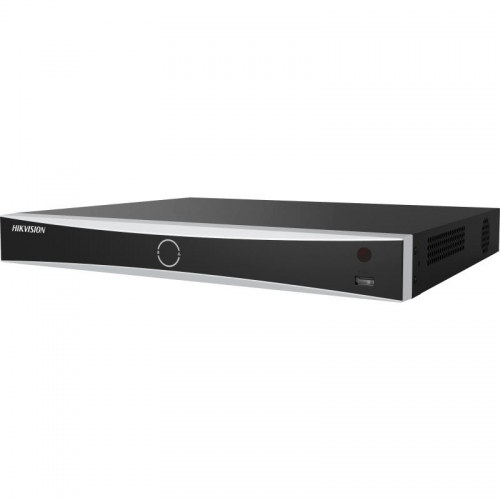
Hikvision DS-7616NXI-I2-16P-VPRO 16-Channel VPro AcuSeek NVR – 16 PoE, No HDD
The Hikvision DS-7616NXI-I2-16P-VPRO gives your CCTV system a central place to record, review and manage security footage. Designed for 16-camera IP surveillance installations, it is a practical choice for businesses that need organised coverage across entrances, work areas, stock rooms and outdoor approaches. Choose it when you want a dedicated recording platform with room to build a system around the way your premises actually operate.
Why choose this recorder?
Spend less time manually searching recordings. The VPro platform combines AcuSeek and AcuSearch with compatible Hikvision cameras and firmware, helping operators locate relevant people and vehicles more efficiently. AcuSeek supports description-based video searching, while AcuSearch helps find a selected target across supported footage. Intelligent functions require the correct camera configuration and share processing resources; they are not a guarantee of identifying every event.
Instead of treating every camera as an isolated device, a network video recorder brings the system together. Staff can review a sequence of events across different viewpoints, check what happened before and after an incident, and export relevant footage for follow-up. A carefully planned installation can support day-to-day operations as well as incident investigation, helping you understand deliveries, access and activity around your property.
Technical specifications
| IP camera inputs | 16 |
| Integrated PoE | 16 ports; IEEE 802.3af/at |
| Storage | 2 × SATA; no HDD included |
| Main display output | HDMI up to 4K/30Hz |
| Compression | H.265+, H.265, H.264+, H.264 |
| Intelligent searches | AcuSeek and AcuSearch; compatible cameras and configuration required |
| AI architecture | Dual-engine VPro processing |
| Network connection | Gigabit Ethernet uplink |
| Additional display | VGA up to 1080p |
| Remote management | Hik-Connect support; network configuration required |
| Planning note | Confirm resolution, bandwidth and simultaneous AI workload for the supplied firmware |
Plan storage around your business
This listing is supplied without a hard drive. Choose compatible surveillance-grade storage to suit the number of cameras and the recording history you need. Recording time depends on camera resolution, frame rate, compression, bitrate, activity levels and the recording schedule. Continuous recording creates a more complete timeline, while event-based recording can reduce storage use where the application allows it. Ask Nepean Micro Computers to help size the storage before you finalise your system.
Compression is useful for managing recording capacity, but good evidence still depends on sensible camera settings. Reserve sufficient bitrate for the detail you need to see, and test sample footage under the real lighting conditions at your site. A clear view of a doorway or loading point is often more useful than a very wide view that leaves the subject too small.
Designed for a complete IP CCTV installation
Integrated PoE ports simplify compatible camera connections by carrying power and data over suitable Ethernet cabling. Check the total PoE budget and the power requirement of each device, particularly PTZ cameras, heaters and long-range illuminators. Additional network-connected cameras require appropriate external network and power equipment. Plan cable routes, network capacity, ventilation and physical access to the recorder so routine maintenance remains straightforward.
Camera recording support, live display and simultaneous playback are separate performance limits. Check the combined camera bandwidth and decoding requirements rather than assuming every channel can display its highest resolution at once. Advanced camera events and intelligent searches depend on the exact camera, recorder firmware and selected operating mode. Third-party connectivity may provide basic video while offering fewer event or configuration options.
Make everyday security easier to manage
A dedicated monitor at the premises can give authorised staff a useful overview, while properly configured network access supports convenient management. Set individual user permissions to match staff responsibilities, keep the system clock accurate, and test footage export before an incident occurs. These practical steps help turn recorded video into information that can be found and used when it matters.
This model is well suited to buyers planning a structured upgrade from a smaller recorder or replacing ageing equipment. Check your existing camera models, stream settings and hard-drive requirements before migrating. For a new installation, start with the areas you most need to protect and allow capacity for future cameras where practical.
Buy from Nepean Micro Computers
Nepean Micro Computers has served Penrith since 1993. We can help you select cameras, recording storage, cabling, network equipment and a suitable display for your application. Bring us your camera list and intended recording period so we can help you put together a balanced CCTV solution. Cameras, monitor, cabling and accessories are sold separately unless specifically included above.
Manufacturer information
View Hikvision specifications and model documentation. Regional hardware and firmware revisions can affect feature availability; confirm the exact supplied configuration before installation.
Hikvision DS-7616NXI-I2-16P-VPRO 16-Channel VPro AcuSeek NVR – 16 PoE, No HDD
- Brand: Hikvision
- Product Code: DS-7616NXI-I2-16P-VPRO
- Availability: In Stock
-
$1,515.00
Tags: DS-7616NXI-I2-16P-VPRO, Hikvision, NVR, VPro, AcuSeek, AcuSearch, PoE