
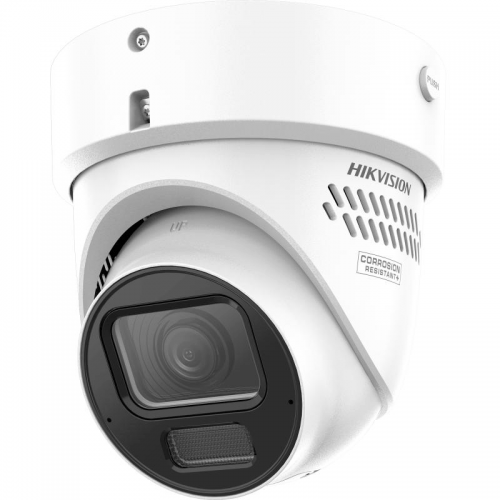
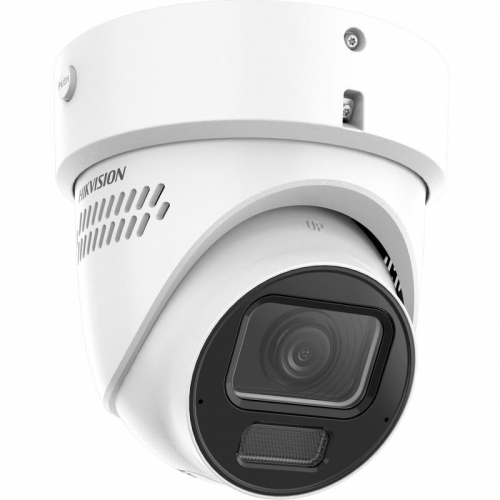
Hikvision DS-2CD3H87G3-LIZSUY-SL 8MP Motorised Turret – White, Hybrid Light, Strobe & Audio
The Hikvision DS-2CD3H87G3-LIZSUY-SL is designed for customers who want useful security footage and a camera that suits the job. 8MP imaging and a motorised lens make this turret a flexible option for detailed IP surveillance. Available from Nepean Micro Computers in Penrith, this model can form part of a carefully planned IP CCTV system for a home, shop, workshop, warehouse or commercial property, according to the requirements of the installation.
Why this model deserves a place in your system
Refine the view electronically with a motorised lens, then configure supported person and vehicle events around the areas that matter. The white finish gives you another option when matching cameras to the building. Active warnings can be configured to respond to selected events rather than simply recording them.
Good security is about capturing the right view at the right time. Choose the mounting position around the subject you need to observe, rather than simply covering the largest possible area. A well-positioned camera can show the approach to an entrance, activity around stock or equipment, or movement through a designated zone. Consider combining overview coverage with dedicated closer views where detailed evidence is a priority.
Technical specifications
| Resolution | 3840 × 2160 |
| Sensor | 1/1.8-inch CMOS |
| Lens | 2.7–13.5mm motorised |
| Lighting | IR / white light, up to 40m |
| Imaging | 130dB WDR; HIK AI-ISP |
| Audio | Dual microphone; speaker; two-way audio |
| Warning | Strobe and audible alarm |
| Local storage | microSD up to 512GB, separate |
| Power | 12V DC or PoE+ 802.3at |
| Protection | IP67, IK10; NEMA 4X Y variant |
Practical advantages for everyday monitoring
A turret format suits many wall and ceiling positions. Motorised framing is useful when the final view needs adjustment after cabling and mounting are complete.
For the clearest results, match the field of view to the scene. A wider view is useful for awareness, but spreads the available pixels over a larger area. A tighter view can improve detail on a particular doorway, access point or section of a yard. Do a live test at the intended mounting height and distance, including a person walking through the scene, before finalising the position.
Day and night performance that is planned properly
Evaluate the scene in daylight and after dark. Street lighting, security lights, reflective surfaces and nearby objects all affect the image. Avoid placing the lens where a wall, gutter or overhang dominates the view or reflects illumination directly back into the camera. Published illumination distances describe the reach of supplementary lighting, not a guaranteed distance for recognising a face or reading a number plate. Target size, movement, shutter speed, weather and contrast all affect usable detail.
Keep the viewing window clean and review image settings once the camera is installed. A sensible exposure and bitrate can be more valuable than choosing the highest setting in every menu. Test moving subjects in the real scene, particularly at night, and ensure any lighting is aimed appropriately for neighbouring properties and the intended monitoring area.
Recording, network and power considerations
Connect the camera to a compatible IP network and recorder using correctly specified Ethernet cabling and suitable power equipment. Verify the exact power standard and maximum consumption before choosing an NVR PoE port, switch or injector. Recorder channel capacity, incoming bandwidth, camera resolution, video codec and event support should all be checked together. Advanced analytics and two-way audio may require a compatible Hikvision recorder, software and firmware; basic video connectivity does not guarantee every feature.
Size recording storage for the resolution, frame rate and retention period you need. Continuous recording provides a full timeline, while event-based schedules can reduce storage use where suitable. If local memory-card recording is supported, use a compatible surveillance-rated card and check its health as part of maintenance. Memory cards, recorder storage and network equipment are separate unless specifically stated as included.
A better result from a complete security plan
Review how staff will use the system before installation. Decide which events need attention, who can view recordings and how important clips will be exported. Configure the system clock correctly and test notifications and playback so the system is ready when it is needed. Intelligent event detection is a useful aid, but careful scene setup and realistic testing are still important for reliable operation.
This listing is for the camera model described above. Mounting accessories, cabling, recorder, monitor and additional power equipment are sold separately unless expressly included. Where a product family offers more than one lens or hardware revision, confirm the supplied variant against the specification table before ordering.
Compatible CCTV recorders and accessories
Nepean Micro Computers has served Penrith since 1993. Ask us to help match this camera with suitable Hikvision recording equipment, surveillance storage, Ethernet cabling and mounting accessories. Tell us your existing recorder model, the area you need to cover and your preferred recording period so we can help you build a practical system.
Manufacturer specifications and documentation
View the official Hikvision product information and documentation. Feature availability can vary with regional hardware and firmware. Check the exact model and installation requirements before commissioning.
Hikvision DS-2CD3H87G3-LIZSUY-SL 8MP Motorised Turret – White, Hybrid Light, Strobe & Audio
- Brand: Hikvision
- Product Code: DS-2CD3H87G3-LIZSUY-SL
- Availability: In Stock
-
$648.00
Tags: DS-2CD3H87G3-LIZSUY-SL, Hikvision, IP camera, CCTV, 8MP Motorised Turret – White, Hybrid Light, Strobe & Audio